
These AM5 motherboards will pair perfectly with your Ryzen 7 9800X3D.
Are you planning on picking up AMD’s Ryzen 7 9800X3D processor? Do you need a quality motherboard that can support the high-end gaming chip without forcing you to pay for features you will not use?
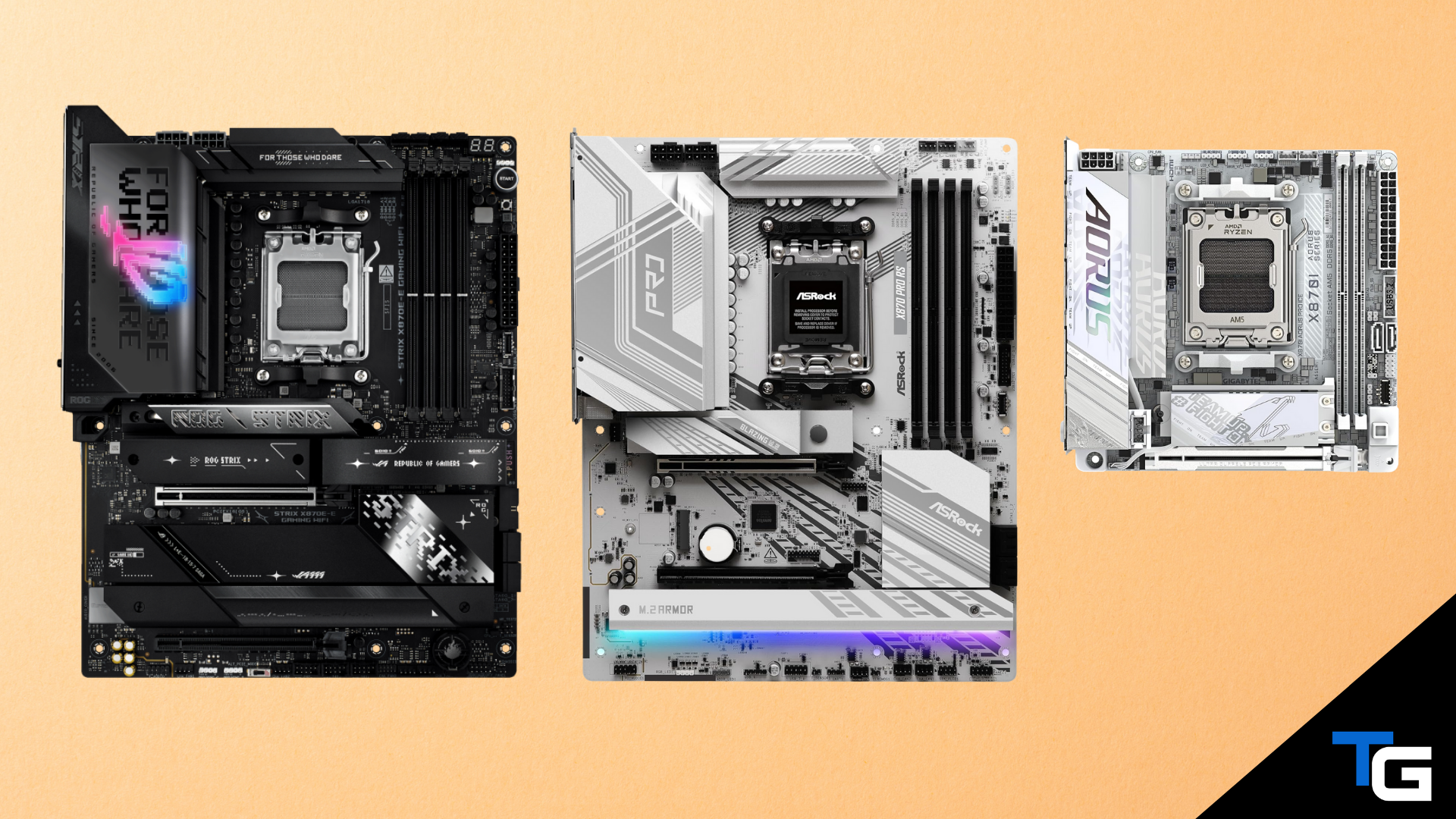
In this guide, we’ve listed six AM5 motherboards that pair well with the Ryzen 7 9800X3D. The options range from feature-rich X870E and X870 boards to more affordable B850 models, with standard ATX, micro-ATX, and Mini-ITX form factors represented.
You do not need an expensive X870E motherboard to get excellent gaming performance from the 9800X3D. A well-built B850 board can run the processor without a problem. The main reasons to spend more are additional M.2 slots, faster networking, more rear I/O, USB4, stronger expansion support, and premium troubleshooting or installation features.
If you’re still planning the rest of your build, see our guides on the best RAM for the Ryzen 7 9800X3D, the best CPU coolers, and the best graphics cards currently available.
Also: Want to save money by opting for the older Ryzen 7 7800X3D? Check out our guide to the best motherboards for the Ryzen 7 7800X3D.
Watch: What to Look for in a Motherboard
Watch our beginner’s guide to choosing a motherboard below, or view it on our YouTube channel. You can also read our full guide on how to choose a motherboard.
Filter for a Motherboard That Meets Your Criteria
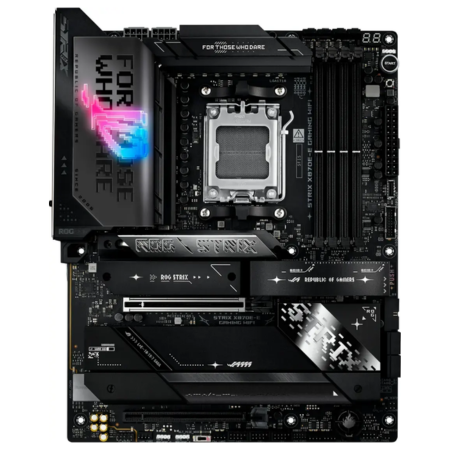
ASUS ROG Strix X870E-E Gaming WiFi
A premium X870E motherboard for an extreme 9800X3D build.
Tech Specs
- Chipset: X870E
- Form Factor: ATX
- PCIe 5.0: GPU + M.2
- WiFi: Wi-Fi 7
- Max RAM: 256GB DDR5
Pros & Cons
- 18+2+2 power stages
- Five M.2 slots
- Dual USB4 ports
- Wi-Fi 7 + 5GbE LAN
- Very expensive
ASUS ROG Strix X870E-E Gaming WiFi Overview
The ASUS ROG Strix X870E-E Gaming WiFi is the most feature-packed motherboard in this guide. Its 18+2+2 power-stage design, substantial VRM heatsinks, and dual 8-pin CPU power connectors are more than enough for the Ryzen 7 9800X3D, including builds that will use Precision Boost Overdrive and Curve Optimizer tuning.
Expansion is a major strength. The board provides a reinforced PCIe 5.0 x16 slot and five M.2 slots, three of which support PCIe 5.0 x4 drives. Connectivity includes two rear USB4 Type-C ports, Wi-Fi 7, Bluetooth 5.4, and 5GbE LAN.
This is not the value choice, and buying it instead of a capable B850 board will not produce a meaningful gaming-performance increase by itself. However, if you want extensive storage, fast wired networking, USB4, premium onboard audio, and a generous selection of DIY-friendly features, the X870E-E is an excellent foundation for a no-compromise 9800X3D system.
Reviews
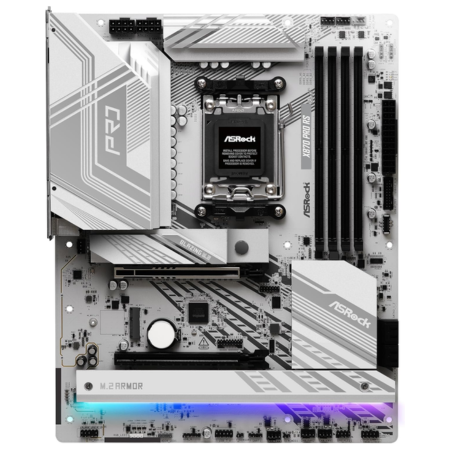
ASRock X870 Pro RS
An affordable X870 board for builders who do not need built-in WiFi.
Tech Specs
- Chipset: X870
- Form Factor: ATX
- PCIe 5.0: GPU + M.2
- WiFi: No
- Max RAM: 256GB DDR5
Pros & Cons
- 14+2+1-phase power design
- White-and-silver design
- Dual USB4 ports
- Strong overall value
- No built-in WiFi
ASRock X870 Pro RS Overview
The ASRock X870 Pro RS is one of the most affordable ways to get the defining connectivity features of the X870 platform. Its 14+2+1-phase, 80A Dr.MOS power design and enlarged heatsinks can comfortably support the Ryzen 7 9800X3D.
The primary graphics slot runs at PCIe 5.0 x16 with the 9800X3D, and the board provides three M.2 slots: one PCIe 5.0 x4, one PCIe 4.0 x4, and one PCIe 3.0 x4/SATA slot. You also get two 40Gbps USB4 Type-C ports on the rear I/O, a front-panel 20Gbps Type-C header, and 2.5GbE LAN.
The tradeoff is wireless connectivity. This specific Pro RS model does not include WiFi or Bluetooth, although it has an M.2 Key E socket if you want to install a wireless module later. If you use Ethernet and want an X870 motherboard with a light color scheme, the X870 Pro RS offers a strong balance of features and price.
Reviews
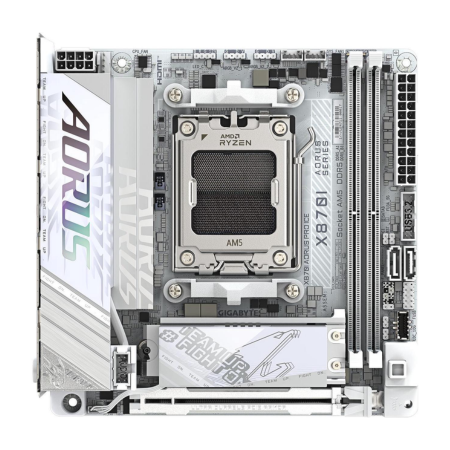
GIGABYTE X870I AORUS PRO ICE
A premium white Mini-ITX motherboard for a compact 9800X3D build.
Tech Specs
- Chipset: X870
- Form Factor: Mini-ITX
- PCIe 5.0: GPU + M.2
- WiFi: Wi-Fi 7
- Max RAM: 128GB DDR5
Pros & Cons
- White Mini-ITX design
- 110A power stages
- USB4 + Wi-Fi 7
- PCIe 5.0 GPU and SSD support
- Only two M.2 slots
GIGABYTE X870I AORUS PRO ICE Overview
The GIGABYTE X870I AORUS PRO ICE condenses the most useful X870 features into a Mini-ITX motherboard. Its 8+2+1 digital VRM uses 110A power stages for the Vcore section, giving it ample power-delivery capability for the Ryzen 7 9800X3D despite the board’s compact size.
The board has one reinforced PCIe 5.0 x16 graphics slot and two M.2 connectors, with one PCIe 5.0 x4 slot on the front and one PCIe 4.0 x4 slot on the back. Networking consists of Wi-Fi 7, Bluetooth 5.4, and 2.5GbE LAN, while a rear 40Gbps USB4 Type-C port provides high-speed external connectivity.
As with most Mini-ITX motherboards, expansion is limited: you get two memory slots, two M.2 slots, and fewer fan headers and rear ports than on a full-size board. Still, for a premium small-form-factor build—especially an all-white one—the X870I AORUS PRO ICE is the most complete compact option in this guide.
Reviews
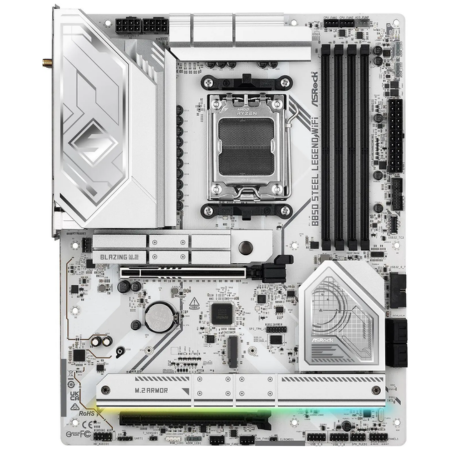
ASRock B850 Steel Legend WiFi
A well-rounded B850 board with strong power delivery and Wi-Fi 7.
Tech Specs
- Chipset: B850
- Form Factor: ATX
- PCIe 5.0: GPU + M.2
- WiFi: Wi-Fi 7
- Max RAM: 256GB DDR5
Pros & Cons
- 14+2+1-phase power design
- Four M.2 slots
- Wi-Fi 7 + 2.5GbE LAN
- White-themed design
- No USB4
ASRock B850 Steel Legend WiFi Overview
The ASRock B850 Steel Legend WiFi is our favorite mainstream ATX option for the Ryzen 7 9800X3D. Its 14+2+1-phase, 80A Dr.MOS power design matches the X870 Pro RS, and its large heatsinks provide plenty of cooling for sustained gaming and productivity workloads.
Storage support is particularly good for the price. The board includes one PCIe 5.0 x4 M.2 slot, three PCIe 4.0 x4 M.2 slots, and four SATA ports. The primary graphics slot supports PCIe 5.0 x16 with the 9800X3D. You also get Wi-Fi 7, Bluetooth 5.4, 2.5GbE LAN, and BIOS Flashback.
It does not include USB4, which is not a required feature on B850 motherboards. For most gaming builds, though, that omission will not matter. Unless you specifically need USB4 or the additional expansion offered by a premium X870E board, the B850 Steel Legend WiFi delivers the features most 9800X3D builders need at a more reasonable price.
Reviews
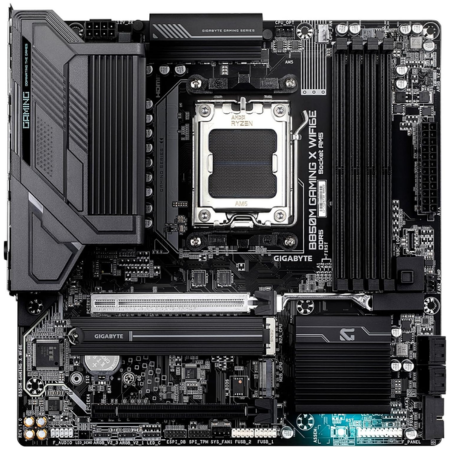
GIGABYTE B850M Gaming X WiFi6E
An affordable micro-ATX motherboard that can comfortably run the 9800X3D.
Tech Specs
- Chipset: B850
- Form Factor: Micro-ATX
- PCIe 5.0: GPU + M.2
- WiFi: Wi-Fi 6E
- Max RAM: 256GB DDR5
Pros & Cons
- Capable 10+2+2 VRM
- PCIe 5.0 GPU and SSD support
- Wi-Fi 6E + 2.5GbE LAN
- Affordable price tag
- Only two M.2 slots
GIGABYTE B850M Gaming X WiFi6E Overview
If you want an affordable micro-ATX motherboard for the 9800X3D, the GIGABYTE B850M Gaming X WiFi6E is a solid option. Its 10+2+2 twin digital VRM and substantial heatsinks are capable of supporting the processor without holding back its stock gaming performance.
Despite its lower price, the board includes a PCIe 5.0 x16 graphics slot and two M.2 connectors, one of which supports PCIe 5.0 x4 SSDs. It also has four DDR5 DIMM slots with support for up to 256GB of memory, plus Wi-Fi 6E, Bluetooth 5.3, and 2.5GbE LAN.
The lower cost does bring compromises. There are only two M.2 slots, no USB4, and fewer high-speed rear USB ports than you will find on the more expensive boards above. Still, its capable power delivery, modern expansion support, compact form factor, and built-in wireless networking make it one of the best-value options for a micro-ATX 9800X3D build.
Reviews
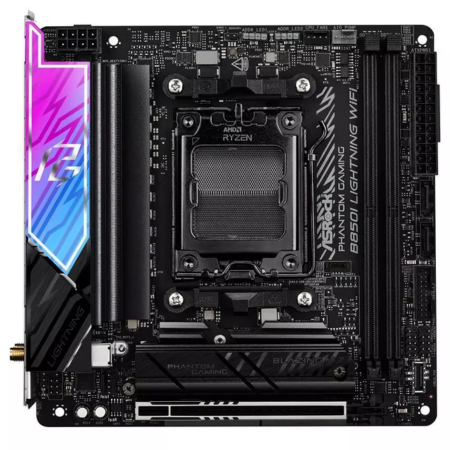
ASRock B850I Lightning WiFi
A more affordable Mini-ITX motherboard for the 9800X3D.
Tech Specs
- Chipset: B850
- Form Factor: Mini-ITX
- PCIe 5.0: GPU + M.2
- WiFi: Wi-Fi 6E
- Max RAM: 128GB DDR5
Pros & Cons
- 10+1+1-phase, 110A power design
- PCIe 5.0 GPU and SSD support
- Good value for Mini-ITX
- No USB4 with the 9800X3D
- Wi-Fi 6E instead of Wi-Fi 7
ASRock B850I Lightning WiFi Overview
The ASRock B850I Lightning WiFi is the value-oriented Mini-ITX alternative to the GIGABYTE X870I AORUS PRO ICE. Its 10+1+1-phase power design uses 110A smart power stages for Vcore, giving it more than enough power-delivery capability for the Ryzen 7 9800X3D.
The board provides a PCIe 5.0 x16 graphics slot, one PCIe 5.0 x4 M.2 connector, one PCIe 4.0 x4 M.2 connector, and two SATA ports. Wireless and wired networking are handled by Wi-Fi 6E, Bluetooth 5.3, and 2.5GbE LAN. BIOS Flashback also makes firmware recovery and updating easier.
You do not get Wi-Fi 7, and the board does not provide USB4 when paired with a Ryzen 7 9800X3D. However, those are reasonable compromises for a less expensive Mini-ITX board. If you want to put the 9800X3D in a compact black system and do not need the premium connectivity of the GIGABYTE X870I board, the B850I Lightning WiFi is the better-value choice.
Reviews
Which Motherboard Should You Get for the 9800X3D?
The ASRock B850 Steel Legend WiFi is the best fit for most Ryzen 7 9800X3D builds. It has strong power delivery, four M.2 slots, Wi-Fi 7, 2.5GbE LAN, and PCIe 5.0 support for both the primary graphics slot and an NVMe SSD without the premium attached to high-end X870E boards.
If you need USB4, additional high-speed storage, or more premium connectivity, the ASUS ROG Strix X870E-E is the feature-rich option, while the ASRock X870 Pro RS offers USB4 for considerably less if you do not need built-in WiFi. For compact systems, choose the GIGABYTE X870I AORUS PRO ICE if you want premium connectivity or the ASRock B850I Lightning WiFi if value matters more.
Before buying, confirm that your motherboard’s form factor fits your case. Our comparison of ATX, micro-ATX, Mini-ITX, and E-ATX motherboards explains the size and expansion differences.
Frequently Asked Questions
What motherboard chipset is best for the Ryzen 7 9800X3D?
For most builders, B850 offers the best balance of price and modern features. X870 and X870E are better suited to users who need USB4, more high-speed expansion, additional M.2 slots, or premium connectivity. The chipset itself will not materially increase gaming performance when the boards being compared can both power the 9800X3D properly.
Does the Ryzen 7 9800X3D need an X870E motherboard?
No. The Ryzen 7 9800X3D works with multiple AM5 chipsets, including B850, X870, X870E, B650, B650E, X670, and X670E. A quality B850 or properly updated B650 motherboard can run it without sacrificing stock gaming performance.
Will a B650 motherboard work with the Ryzen 7 9800X3D?
Yes, provided the specific board has a BIOS version that supports Ryzen 9000 processors and the 9800X3D. If you are buying an older B650 board, check its CPU-support page and look for BIOS Flashback so you can update the firmware without installing a supported older CPU first.
Do I need to update the BIOS for the Ryzen 7 9800X3D?
It depends on the motherboard and when it was manufactured. Current B850, X870, and X870E stock should generally recognize the 9800X3D, but installing the latest stable BIOS is still a good idea for current AGESA updates, memory compatibility, security fixes, and bug fixes. Older B650 and X670-series boards are more likely to require an update before the CPU will boot.
What RAM should I use with the Ryzen 7 9800X3D?
A 32GB DDR5-6000 CL30 kit with an AMD EXPO profile is the safest starting point for most gaming builds. Faster memory can work, but it may require more tuning and will usually provide a smaller real-world benefit than spending the same money on a better graphics card. See our 9800X3D RAM guide for specific kits.
Does the motherboard affect the Ryzen 7 9800X3D’s gaming performance?
Not significantly, as long as the motherboard has adequate power delivery, does not impose restrictive power limits, and runs your memory at the intended settings. A more expensive motherboard primarily buys additional features, connectivity, expansion, and convenience—not a large increase in frame rate.
Can you overclock the Ryzen 7 9800X3D on these motherboards?
Yes. The Ryzen 7 9800X3D supports tuning, and all of the boards in this guide allow CPU and memory overclocking. For most users, Precision Boost Overdrive and Curve Optimizer are more practical than an aggressive manual all-core overclock. Any overclock can increase heat and instability, so test changes carefully and use a capable cooler.
