
These are the best budget CPUs under $200 currently available.
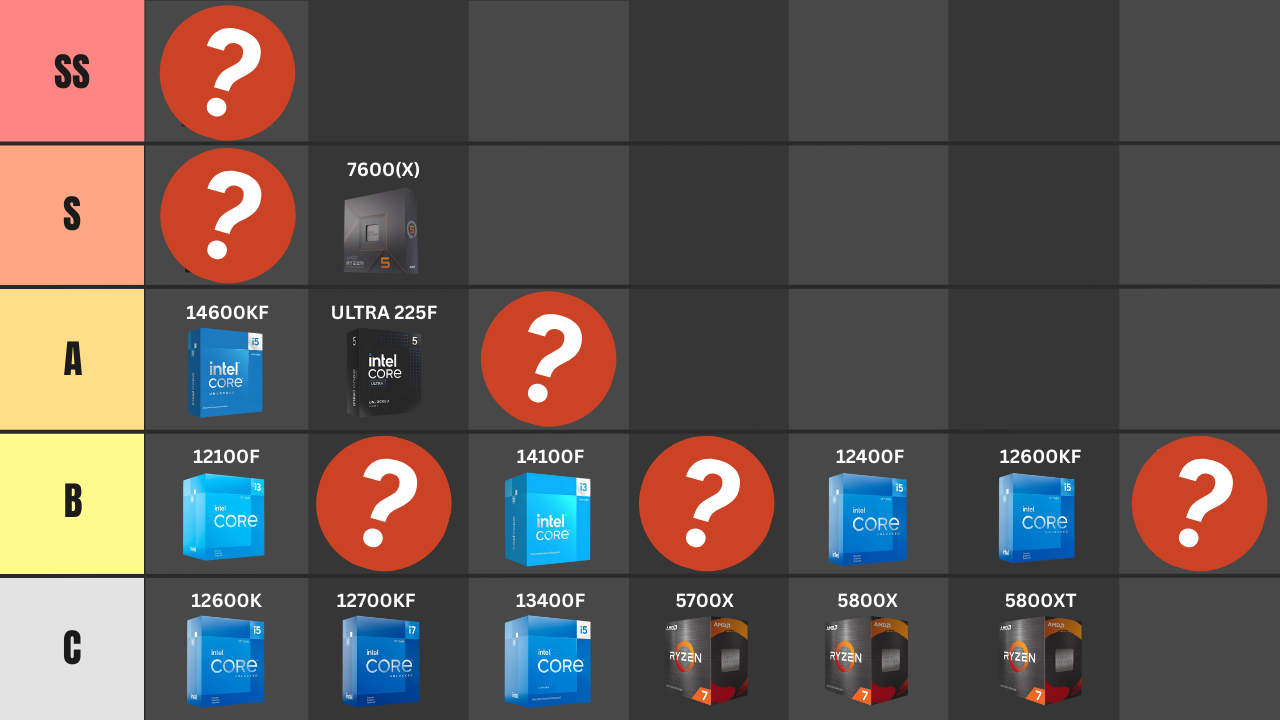
Picking the best CPU for a budget or mid-range gaming build isn’t just about raw performance. You also have to consider the total cost of the platform, the upgrade path you’ll have in the future, and how much of your budget you can preserve for your graphics card.
And, in 2026, platform cost matters more than ever.
DDR5 memory prices have climbed significantly, which means an older DDR4-based build can sometimes make more sense than it would have a year ago. At the same time, AMD has extended support for its AM5 socket through 2029, giving its Ryzen 7000- and Ryzen 9000-series processors one of the best upgrade paths available right now.
Intel has also shaken up the sub-$200 market with its newer Core Ultra processors. In particular, the Core Ultra 5 250K Plus has occasionally dropped below $200, and at those prices it is one of the strongest value CPUs available.
So, rather than ranking processors based on performance alone, the tiers below take gaming performance, CPU price, motherboard cost, memory cost, and future upgrade potential into consideration.
Prices change constantly, though. A CPU that doesn’t make much sense at $180 could suddenly become one of the best options available if it drops to $140.
That’s why I’ve also included a Buy if ≤ price for every option.
Watch: What to Look for in a CPU
Watch our Beginner’s Guide to Choosing A CPU below, or on our YouTube channel.
Quick Look: CPU Tier List
| Tier | CPU | Socket | Memory | Why pick it | Buy if ≤ |
|---|---|---|---|---|---|
| S+ | Intel Core Ultra 5 250K Plus | LGA1851 | DDR5 | Outstanding gaming and productivity performance when discounted. | ≤ $200 |
| S | AMD Ryzen 5 9600X | AM5 | DDR5 | Excellent gaming performance plus AM5’s long upgrade path. | ≤ $190 |
| S | AMD Ryzen 5 7600X / Ryzen 5 7600 | AM5 | DDR5 | Close to the 9600X in games and excellent when heavily discounted. | ≤ $170 |
| A | Intel Core i5-14400F | LGA1700 | DDR4/DDR5 | Strong budget option if you’re trying to avoid DDR5 prices. | ≤ $140 |
| A | AMD Ryzen 5 5600 / 5600X | AM4 | DDR4 | Cheap CPU, motherboard, and memory combination. | ≤ $110 |
| A | Intel Core Ultra 5 225F | LGA1851 | DDR5 | Modern Intel platform, but only compelling after a significant discount. | ≤ $150 |
| B | Intel Core i5-12400F | LGA1700 | DDR4/DDR5 | Still a capable 6-core budget gaming chip at the right price. | ≤ $110 |
| B | Intel Core i3-14100F / 12100F | LGA1700 | DDR4/DDR5 | Excellent ultra-budget gaming performance if every dollar matters. | ≤ $85 |
| B | AMD Ryzen 5 5500 | AM4 | DDR4 | Cheap 6-core CPU that helps keep total system cost down. | ≤ $80 |
| C | i5-12600K/KF, i5-13400F, Ryzen 7 5700X, 5800X, 5800XT | Mixed | DDR4/DDR5 | Mostly upgrade or sale options; pricing has to be aggressive. | ~$120-$140 |
S+ Tier: Intel’s Core Ultra 5 250K Plus
The biggest change to our budget CPU tier list for 2026 is the arrival of Intel’s Core Ultra 5 250K Plus.
When this processor sells for under $200, it’s difficult to ignore.
The 250K Plus gives you 18 total cores—six performance cores and twelve efficiency cores—and offers excellent gaming performance along with significantly more multi-threaded performance than something like the Ryzen 5 9600X.
That makes it especially attractive if you’re building a system that will be used for gaming and things like video editing, rendering, streaming, or other heavily-threaded workloads.
Recent price drops have made the 250K Plus especially interesting, as it has occasionally sold well below its original ~$200 pricepoint.
However, there is one major reason why I wouldn’t automatically choose the 250K Plus over AMD’s alternatives: the platform.
The 250K Plus uses Intel’s LGA1851 socket, and its future upgrade path isn’t nearly as attractive as AMD’s AM5 platform.
So, I’d break the decision down like this:
If the Core Ultra 5 250K Plus is significantly cheaper than the Ryzen 5 9600X: I’d probably take the Intel CPU.
If they cost roughly the same: I’d lean toward the Ryzen 5 9600X for a gaming-first build because of AM5’s much better long-term upgrade path.
Also Read: Best CPUs for Gaming
S Tier: Ryzen 5 9600X & Ryzen 5 7600X
AMD’s Ryzen 5 9600X remains one of the safest CPU recommendations you can make for a gaming-focused build under $200.
It’s a 6-core, 12-thread Zen 5 processor that offers excellent gaming performance while consuming relatively little power.
More importantly, though, you’re getting access to AMD’s AM5 ecosystem.
AMD has now committed to supporting AM5 through 2029, so a budget builder who buys a 9600X today should have considerably more future CPU upgrade options than someone buying into Intel’s LGA1700 or LGA1851 platforms.
That’s a huge advantage.
The older Ryzen 5 7600X is also still worth considering.
The 9600X is faster, but the difference isn’t large enough to justify paying a huge premium.
So, if the 9600X costs $180-$190 and the 7600X costs $160-$170, I’d probably take the 9600X.
But if the 7600X drops into the ~$140-$150 range while the 9600X stays closer to $190-$200, the 7600X becomes the better value.
Both CPUs also make sense in gaming PCs well above the traditional “budget” range.
If choosing one of these CPUs instead of a $300+ processor allows you to move up another tier on your graphics card, you’ll usually get a bigger overall improvement in gaming performance from putting that extra money toward the GPU.
Also Read: Best AMD CPUs for Gaming
A Tier: The Best Alternatives
Our A-tier contains three very different options: the Core i5-14400F, Ryzen 5 5600, and Core Ultra 5 225F.
Intel Core i5-14400F
The Core i5-14400F is no longer one of Intel’s newest processors, but it has one important advantage for budget builders: it can be paired with either DDR4 or DDR5 memory.
Normally, I’d strongly lean toward a newer DDR5 platform when building an entirely new gaming PC.
However, with memory pricing where it is in 2026, an inexpensive DDR4 kit combined with a discounted B760 motherboard and 14400F can result in a much cheaper overall platform.
The problem is that LGA1700 has reached the end of its meaningful CPU upgrade path.
So I wouldn’t pay anywhere near $200 for a 14400F.
But at around $130-$140—or as part of a heavily discounted CPU/motherboard bundle—it can still make a lot of sense.
AMD Ryzen 5 5600
The Ryzen 5 5600 is another older CPU that has become more interesting again because of total platform cost.
A budget B550 motherboard, Ryzen 5 5600, and DDR4 memory can be significantly cheaper than putting together a comparable AM5 system.
The 5600 is also still plenty capable for a budget gaming PC, especially if you’re pairing it with a mainstream graphics card.
The downside is that AM4’s upgrade story isn’t as attractive as it used to be.
The Ryzen 7 5700X3D was previously the obvious future gaming upgrade for someone starting with a Ryzen 5 5500 or 5600, but the 5700X3D has reached end-of-life and finding one at a reasonable price has become much more difficult.
AMD has brought back the Ryzen 7 5800X3D in a special 10th Anniversary Edition, but its price puts it well outside the range that would make sense as an upgrade for most budget builders.
Therefore, I’d now view a Ryzen 5 5600 build as a way to build a capable gaming PC as cheaply as possible today rather than as a system with a strong CPU upgrade path.
Intel Core Ultra 5 225F
The Core Ultra 5 225F is an interesting option, but it lives in a difficult part of the market.
It puts you onto Intel’s newer LGA1851 platform and gives you ten cores, but its gaming performance isn’t good enough to justify buying it when a Ryzen 5 9600X or 7600X costs roughly the same amount.
And now that the much faster Core Ultra 5 250K Plus occasionally falls below $200, the 225F becomes even harder to recommend at its normal price.
At ~$140-$150, though, it’s a different story.
So, I’d consider the 225F an A-tier option only when it is heavily discounted.
B Tier: Ultra-Budget CPU Options
Moving down into the B-tier, we have the Intel Core i5-12400F, Core i3-14100F, Core i3-12100F, and AMD Ryzen 5 5500.
These are the CPUs I’d look at if you’re trying to build a gaming PC with all-new parts and you’re working with an extremely tight budget.
In my opinion, these processors make the most sense in gaming PCs in roughly the $500-$700 range.
Also Read: The Best $500 Gaming PC Build for 2026
At this price level, your graphics card is usually going to have a much bigger impact on your gaming experience than moving from something like a $75-$100 CPU to a $150-$200 CPU.
So, if saving $50-$75 on your processor allows you to step up to a noticeably better graphics card, that’s often the better way to allocate your budget.
Intel Core i3-14100F & 12100F
Intel’s Core i3 processors continue to offer impressive gaming performance considering how inexpensive they can be.
The Core i3-14100F is the fastest option of the group, but I’d simply buy whichever model—the 12100F, 13100F, or 14100F—is significantly cheaper.
The problem with these processors isn’t really their gaming performance.
It’s that you’re buying a four-core CPU on an LGA1700 platform that doesn’t have much of a future.
That’s fine for an ultra-budget gaming PC, but you shouldn’t spend extra money trying to “future proof” a Core i3 build.
If you can get one for ~$70-$85 and pair it with an inexpensive DDR4 motherboard and memory kit, though, it can still be an excellent way to preserve more of your budget for your graphics card.
AMD Ryzen 5 5500
AMD’s Ryzen 5 5500 continues to hang around because it’s incredibly cheap.
For around $70-$80, you’re getting six Zen 3 cores and twelve threads along with a stock cooler.
That’s a lot of CPU for the money.
Its drawbacks are significant, though.
The 5500 has less cache than the Ryzen 5 5600 and is limited to PCIe 3.0, so it isn’t simply a slightly slower 5600.
And, as mentioned above, AM4 no longer has the inexpensive high-end gaming upgrade path it had when the 5700X3D was readily available.
But if you’re building the cheapest capable gaming PC possible, pairing the 5500 with an inexpensive B450/B550 motherboard and DDR4 memory is still one of the easiest ways to keep costs down.
If the Ryzen 5 5600 is only ~$20-$25 more, though, I’d move up to the 5600.
Intel Core i5-12400F
The Core i5-12400F is another older processor that is still perfectly capable of powering a budget gaming PC.
It’s a 6-core, 12-thread CPU and generally offers better gaming performance than the Ryzen 5 5500.
It can also be paired with DDR4 memory, which makes it particularly relevant right now.
The issue is price.
At $140-$150, there are newer CPUs I’d rather have.
At ~$100-$110, though, the 12400F becomes a much more compelling option.
C Tier: CPUs to Watch for Sales
The C-tier contains processors that aren’t necessarily bad, but don’t make much sense at their typical asking prices.
This includes CPUs such as Intel’s Core i5-12600K/KF and i5-13400F, along with AMD’s Ryzen 7 5700X, 5800X, and 5800XT.
For someone who already owns a compatible motherboard, one of these CPUs could make sense as a drop-in upgrade.
For a completely new gaming PC, though, I’d usually rather put the money toward an AM5 build with a Ryzen 5 7600X or 9600X—or grab a Core Ultra 5 250K Plus when it falls below $200.
That doesn’t mean you should completely ignore these older processors.
CPU pricing is volatile, and older chips frequently get aggressive discounts as retailers clear inventory.
So this is really more of a watch price tier than a “don’t buy” tier.
If something like an i5-12600KF or Ryzen 7 5700X falls into the ~$110-$130 range, the value equation can change very quickly.
What About the Ryzen 5 7500F & 9500F?
The Ryzen 5 7500F was one of our favorite value CPUs in the previous version of this guide.
On paper, it still is.
It gives you six Zen 4 cores, twelve threads, DDR5 support, and access to the AM5 platform while removing the integrated graphics found on the standard Ryzen 5 7600.
The problem continues to be availability.
The 7500F was never broadly launched through normal U.S. retail channels, so most listings come through marketplace sellers or imported inventory.
The newer Ryzen 5 9500F follows a similar idea, this time using AMD’s Zen 5 architecture, but its availability has also been heavily dependent on region.
If you can find either processor from a seller you trust at a significant discount, they’re worth considering.
You can check current Ryzen 5 7500F pricing here.
My rough target would be:
Ryzen 5 7500F: ~$140-$150 or less
Ryzen 5 9500F: ~$160 or less
Once you get much above those prices, I’d rather buy a Ryzen 5 7600X or 9600X from a normal U.S. retailer.
Which Budget CPU Would I Choose?
For a completely new gaming PC, my choices would be pretty straightforward.
If the Core Ultra 5 250K Plus is available for ~$180-$200 or less, it offers an incredible amount of performance for the money—especially if you’re going to do productivity work in addition to gaming.
For a gaming-first system that I wanted to upgrade in the future, I’d take the Ryzen 5 9600X. AMD’s commitment to supporting AM5 through 2029 makes it difficult to beat from a platform-longevity standpoint.
If I wanted an AM5 system for as little money as possible, I’d watch the Ryzen 5 7600X.
And if I were trying to build the cheapest gaming PC possible, I’d start by comparing the Ryzen 5 5500, Ryzen 5 5600, Core i3-14100F, and Core i5-12400F and then choose whichever combination of CPU, motherboard, and memory left the most room in my budget for the graphics card.
That’s really the key at this end of the market.
Don’t evaluate the CPU’s price by itself.
A $120 CPU that requires a $150 motherboard and expensive DDR5 memory could result in a more expensive build than a $150 CPU that works with a $90 motherboard and inexpensive DDR4.
If you’re unsure about motherboard compatibility, check out our guide on how to choose a motherboard.
Verify Prices Before You Buy
It’s important to note that while we believe this CPU tier list is accurate at the time of writing, CPU pricing changes constantly.
And at the sub-$200 end of the market, even a $20-$30 price change can completely rearrange the rankings.
The Intel Core Ultra 5 250K Plus is a perfect example. At over $220, I’d probably choose a Ryzen 5 9600X instead for a gaming build. Drop the 250K Plus into the $150-$180 range, however, and it becomes incredibly difficult to beat.
The same is true further down the list.
A Ryzen 5 5600 at $100 is a great budget option. At $140, it isn’t.
A Core i5-14400F at $130 can make sense. At $190, it doesn’t.
So, use the Buy if ≤ prices in the table above as a general guideline and compare the total cost of the CPU, motherboard, memory, and cooler before making your final decision.
